
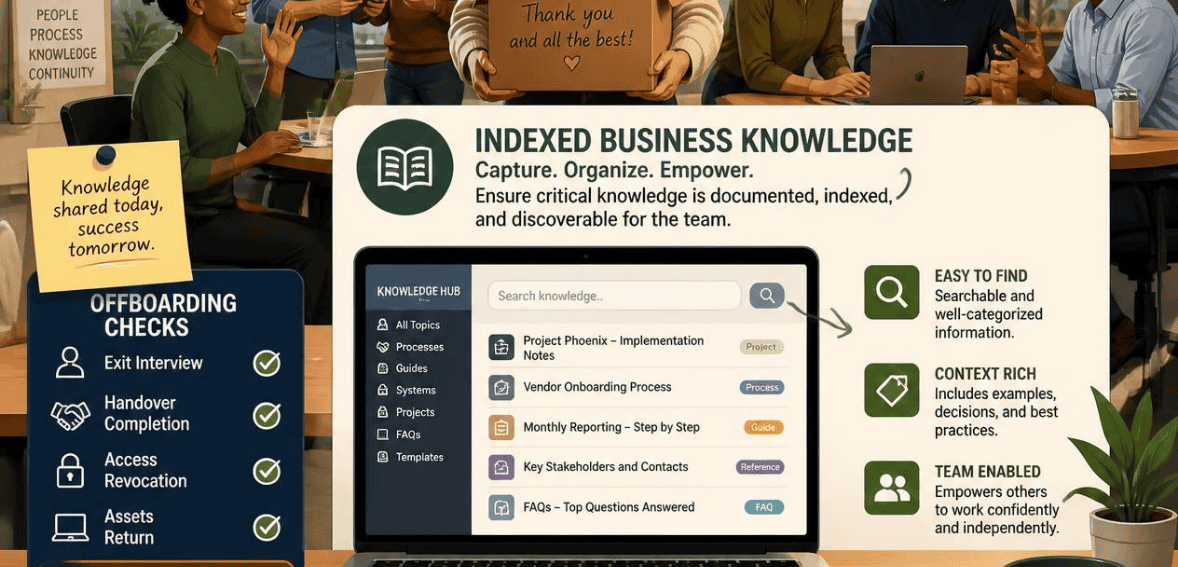
An employee hands in their badge. IT disables their single sign-on. The laptop goes back in the box. On paper, the offboarding looks clean. But the company’s AI assistant still holds everything that person ever touched. Every project doc. Every Slack thread. Every buried spreadsheet. And in too many cases, the departing employee can still reach it.
That gap is the new blind spot in modern security. Old offboarding checklists were built for a simpler world. That means they were not designed for AI systems that record and index every detail of your world and can answer questions about it. That is why AI knowledge access employee offboarding is a required control, not a desired control. Let’s define it and see how it is done correctly.
Why Traditional Employee Offboarding No Longer Protects Your Business Knowledge
For years, the offboarding routine stayed the same. Disable the account. Kill the VPN. Collect the hardware. Run an exit interview. Those steps still matter. But they only cover the doors you can see.
AI has impacted the workplace as companies integrate large language models with SharePoint, Google Drive, Confluence, Jira, and other platforms. These models allow employees to generate text using many different sources in a single system. It’s common for companies to disable someone’s login. However, AI sits above a substantial amount of content and is rarely, if ever, disabled.
Studies show this should be a real concern. Approximately half of employees who leave companies still have access to parts of the system. This means each of these accounts is an active threat. Integrating AI tools makes this exposure grow rapidly. That is the main reason that AI knowledge access offboarding should be added to every checklist.
What “Indexed Business Knowledge” Actually Means
Before you can secure something, you have to understand it. Indexed business knowledge is the searchable, machine-readable copy of your company’s information. It is not the original document sitting in a folder. It is the version that an AI system has already read, chopped up, and stored so it can answer questions later.
How RAG and AI Assistants Index Your Company Data
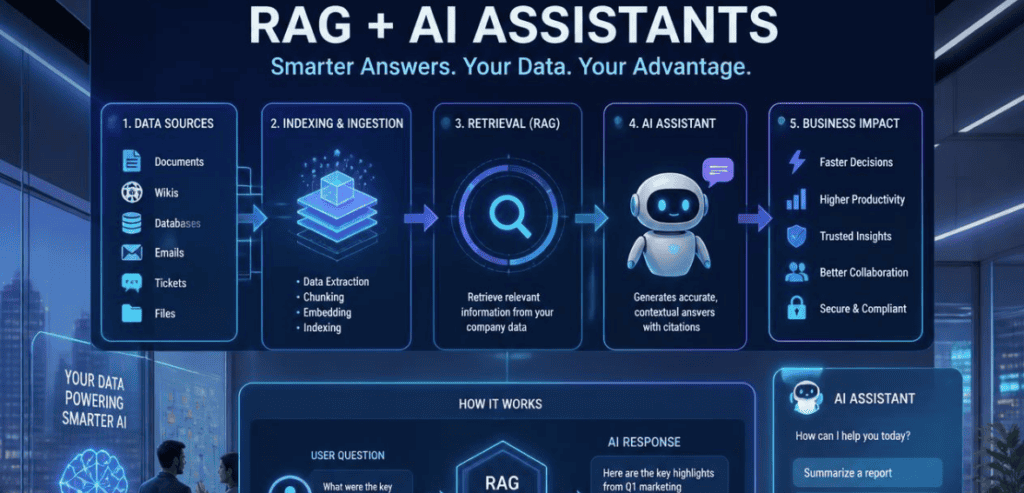
Most enterprise AI systems use the retrieval-augmented generation framework (RAG) to function. These systems convert client documents to embeddings, which are mathematical formats, and store those embeddings in a vector database. To respond to a prompt, a system retrieves the most related embeddings and provides the model with those. The model then composes an understandable response to the prompt.
The composition of systems as described is powerful because an employee is able to ask a question such as “What is the PTO policy?” and receive a response, rather than having to parse a large collection of hyperlinks. That said, there is a significant drawback. Vector databases do not necessarily have the permissions of the original sources. If you index your entire company into one database, AI can act as a master key. Indexing your documents to one location allows the model to be a skeleton key and disregard the boundaries of sensitive documents.
This is the fundamental challenge of text automation. Automated text can be easily copied and pasted and shared to an external location where the original document cannot be secured.
The Hidden Risk: Authorization Drift After an Employee Leaves
Security teams have a name for this problem. They call it authorization drift. It is the gap between what a person can open directly and what an AI pipeline can retrieve on their behalf.
Envision a junior analyst who asks a simple credit risk question. The retrieval system thinks a confidential board report would best answer the question and reveals board-level information that analysts do not have clearance to view. The app registers a query. The system works as intended, designed to never ask if the user should receive the answer, and no alarms or records of noncompliance are created.
Consider this case for an employee who departs the company. If this employee’s access to the AI tool is overlooked, they can continue to ask questions of the tool and harvest knowledge from the answers. This employee could harvest competitive information, customer or client data, and even company plans. This is why offboarding systems must be implemented to close both the front end and the retrieval system.
A Practical AI Knowledge Access Employee Offboarding Checklist
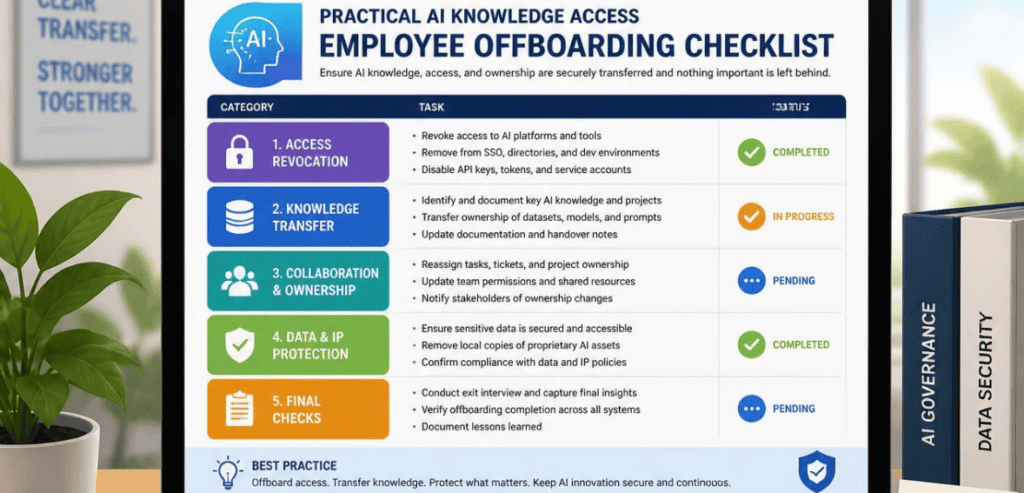
A strong process treats offboarding as a security control with an audit trail, not a paperwork task. The goal is simple. When a person’s tenure ends, their reach into your indexed knowledge should end at the same moment. Here is how the workflow comes together in practice.
Map the Full Access Footprint Before the Last Day
The most helpful exits are planned early. Before the last day, document where your employee can go to access any of the company’s data. This includes licenses for their AI assistant; applications that are linked to the assistant; keys, tokens, and other means of personal access; and any automation they have set up. Many, if not all, of these are outside of your identity provider, so conducting a discovery scan is necessary. Most checklist systems designed to disable the SSO account only will overlook AI credentials that are stored locally on the employee’s device.
Revoke AI Tool Credentials and API Keys
Disabling someone’s identity provider account feels final, but it often is not. Developers frequently connect AI coding assistants to outside services using keys they generate by hand. Those keys sit in local files, IDE settings, or the tool’s own credential store. Turning off the main account does not touch them. So the offboarding process must include a direct audit of AI tool credentials, followed by rotation of any shared secrets the person could have seen.
Audit AI Agents, Bots, and Automations
People create AI tools, not just use them. A departing employee may have set up chatbots, scheduled agents, or automated workflows that run after the employee exits the organization. These can operate with broad access and no oversight. The safe order is to disable triggers first, unpublish the agent, and delete it. You must confirm the deletion before you close the ticket. Having an orphaned agent is the same as having a key under the mat.
Re-index and Reassign Ownership of Knowledge
This last step protects the business beyond just the perimeter. Assign ownership of any documents, runbooks, or system notes that named the departing individual to someone else, and also update the AI index. The AI index should reflect the current permissions and owners. This preserves the institutional knowledge and, at the same time, permanently removes the link to the old responsible individual.
Tools That Support Secure AI Knowledge Access Offboarding
Several platforms can automate large parts of this process. Here are a few worth knowing, each with its own strength.
Microsoft 365 Copilot
Copilot is layered on top of Teams, SharePoint, OneDrive, and Outlook. It is for this reason that it requires an intentional exit. For an entire Microsoft solution, this means revoking the Copilot license, checking any custom agents created in Copilot Studio, and reviewing Power Automate flows the user generated. For identity in this case, Microsoft Entra ID takes care of account disabling, role revocation, and session closure. Without addressing the Copilot layer, indexed data will still be reachable even with the core account removed.
Okta and Microsoft Entra ID
Identity providers are the backbone of deprovisioning. Okta and Entra ID let you disable accounts, revoke roles, and end active sessions from one place. They are the trigger point for most automated offboarding. Their limit is scope. They govern what they can see. AI tools that someone signed up for with a personal email stay invisible to them, which is why identity control alone is never the full answer.
CloudEagle.ai and BetterCloud
These SaaS management platforms help with sprawl. They identify the apps your identity provider overlooked, and revoke access and reclaim licenses for your entire tech stack. BetterCloud can remove file permissions in bulk and log all activities for auditing. CloudEagle.ai focuses on quick and consistent deprovisioning to minimize access time without ownership. For companies overwhelmed by shadow AI, this visibility can help you have a clean exit as opposed to leaving a hole behind.
Building AI Knowledge Access Offboarding Into Secure AI Operations
Treating everyone’s exit as a singular event creates a lot of opportunities for mistakes. A better approach is to bundle all AI access and knowledge withdrawal integration into a single secure AI operations program. This would mean supporting permission-based retrieval, ensuring the AI surfaces only what the user is cleared to see. This would also mean incorporating role-based controls across the source, at the point of ingestion, and at the point of retrieval. It would also mean having logs to ensure that an auditor can confirm withdrawal was done properly.
The number of days between a resignation and the actual last working day is important. This is the time period when the data is most likely to be stolen. This is not about trying to be suspicious of everyone. It is more about how you should act when a confirmed departure is made. During this time period, access is monitored, and full access is denied at the end of the last working day. Access should be denied in minutes, not in days.
Frameworks can be used here. The NIST AI Risk Management Framework helps organizations think about managing AI risks throughout its lifecycle. For the retrieval layer, the OWASP GenAI Security Project describes a number of failure modes present in most LLMs. If we add this to a strong employee offboarding process, we can create a defensible and repeatable process.
Conclusion
AI has made your company’s knowledge faster to find and far harder to fully lock down. A departing employee no longer needs to copy files to walk away with sensitive information. If the AI still answers to them, the knowledge walks out on its own. That is why AI knowledge access offboarding now belongs at the center of every secure exit, not tacked on at the end.
The winning approach is simple to state and worth the effort to build. Map the full footprint early. Revoke AI credentials, keys, and agents, not just the login. Refresh the index and reassign ownership. Fold all of it into your secure AI operations program with clear logs and permission-aware retrieval. Do that, and every exit closes cleanly, protecting both your data and your peace of mind.
Frequently Asked Questions
What is AI knowledge access offboarding?
It is the process of cutting off a departing employee’s access to AI systems that have indexed your company data. Standard offboarding disables logins and collects hardware. AI knowledge access offboarding goes further. It revokes AI tool licenses, rotates API keys, removes agents the person built, and refreshes the search index so former staff can no longer pull answers from your knowledge base.
Why isn’t disabling someone’s login enough anymore?
Because AI tools often live outside your identity provider. A person may hold API keys stored on their own device, agents that run on their own, or AI apps signed up for with a personal email address. Turning off the main account leaves those paths open. This gap, known as authorization drift, lets an AI pipeline surface data the user could no longer open directly.
How quickly should AI access be revoked when someone leaves?
Fast. The revocation window should be minutes, not days. Delayed offboarding is a known risk, since a large share of former employees keep some access after departure. The safest practice is to revoke full access at the end of the last working day or when equipment is returned, whichever comes first.
Can offboarding preserve knowledge and still stay secure?
Yes, and the best processes do both. Before you cut access, capture and reassign the departing person’s key documents and responsibilities. Then refresh the AI index to reflect the new owners and current permissions. This keeps institutional knowledge available to the team while closing the old employee’s access at the same time.