
By Richelle Bennett September 22, 2026
Your company’s smartest new hire never sleeps. It reads every document, every Slack thread, every ticket, and every wiki page in seconds. Then it answers questions in plain English. That new hire is your enterprise AI search tool. And it just might hand a junior analyst the CEO’s compensation memo.
This is the hidden danger associated with contemporary search. AI doesn’t create oversharing; it exposes oversharing. The solution isn’t slowing the rollout. The solution is permission-aware enterprise search – search that understands who is permitted to view what, at each and every stage.
This guide explains how we think about Permission-Aware Enterprise search and access. We examine the mechanics, the predominant shortcomings, and how the top players in the market solve the issue. The solution is straightforward. If a user is not permitted to access a file in the source system, that user should not be able to view that file in search results, nor in an AI-generated answer.
What Is Permission-Aware Enterprise Search?
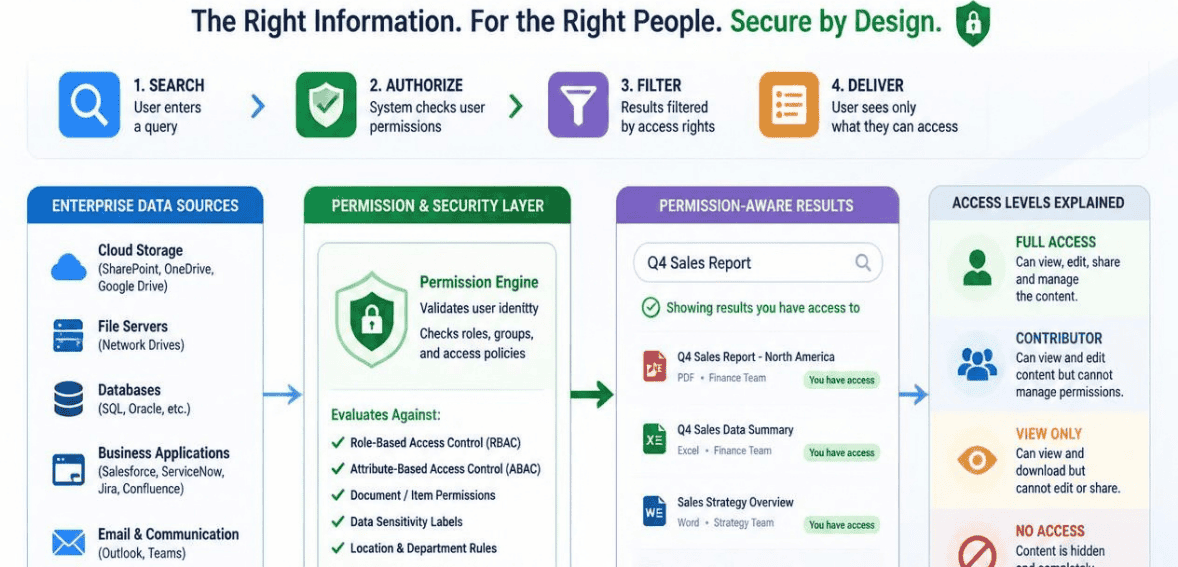
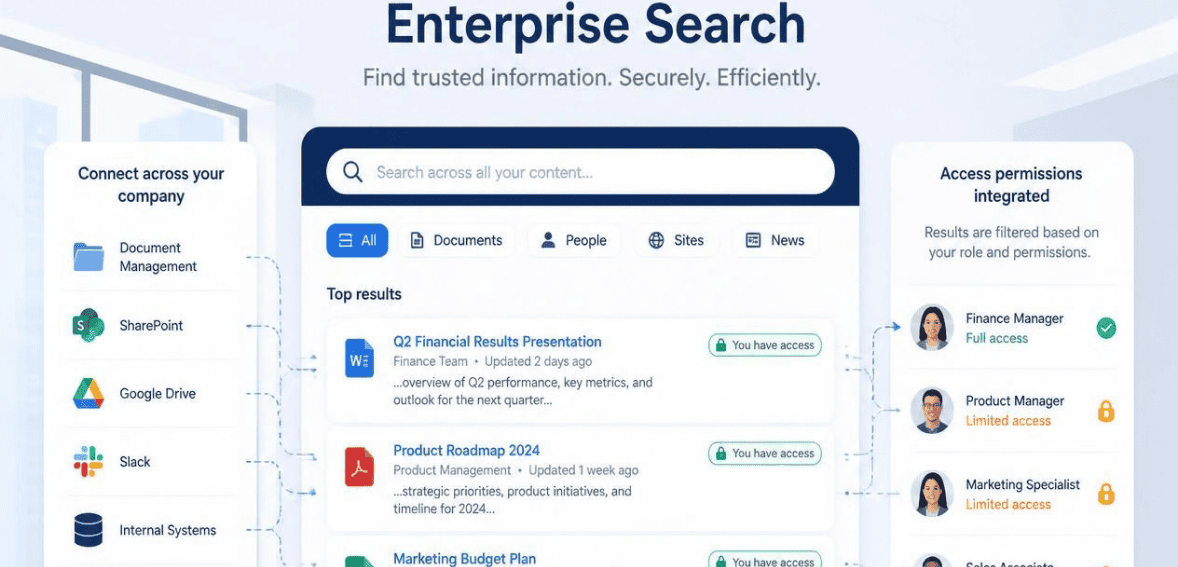
Enterprise search that is permission-aware is search that inherits and enforces existing access controls. It can filter indexed content and results based on true permissions for every user.
You can think of access rules like a mirror. There are existing access rules in your systems, and there is no way to create new ones. A file in a SharePoint folder that has restrictions will make the search application perceive the file as restricted. The search application will also keep a record in Salesforce locked.
It’s that simple. The search application does not show anything to the user that they could not access in the source application, even the full files, records, AI-generated summaries or answers, titles, or even previews.
This is very important because with AI, one simple mistake can cause a very big problem. For instance, a single broken permission used to be a discrete mistake. Now, a chatbot can expose the mistake within seconds. Access controls have always been very important, but with AI search, we have now exceeded that.
Why Access Controls Must Carry Through the Search Layer
Enterprise search spans many systems and each can have different permissions, retention rules, and sensitivities. Different systems, like Google Drive, Confluence, and ServiceNow, have different ways of managing access.
The search layer needs to be able to translate multiple languages accurately, which is “carry-through.” Access restrictions should be preserved from the original system, through indexing and retrieval, and in the response output.
When access restrictions are not adhered to, issues arise. Users should not see the title of a document that they should not know exists. An AI response should not point to a document that remains closed, and access restrictions should prevent the document’s information from being released. Retrieval-augmented generation (RAG) further complicates the issue because an AI system is able to confidently generate a coherent summary that contains information about a document that should be access-restricted.
Access restrictions are dynamic. Employees change roles, projects end, and employees leave the organization. A permission-aware search system needs to be agile and responsive. For example, if an employee is no longer able to access a folder on a Monday, that folder should not appear in search results that same day, and not the following Monday after the next scheduled reindex.
The Oversharing Problem AI Search Exposes
The permission sprawl that comes with years of rapid growth affects almost every large organization. Folders are shared for a temporary purpose, only to become permanent. Legacy security groups are created and forgotten. Sharing links are set to wide access and are used well past their intended use.
For the longest time, solving this issue was not a priority. The inability to perform searches across an entire system meant that the gaps weren’t that significant. With the advent of Enterprise AI search, you can now perform a search across the entirety of your working data with a single prompt.
The proliferation of group access is one of the chief causes of this problem. Some examples of this would be a group that consists of every employee in the organization. Five years ago, having a Company Shared HR Site would not raise any concerns. Now, every employee can use an AI tool to generate a summary of that document. The AI is performing its function based on the access permissions for the employee.
It’s essential to capture the sentiment that being access permission-aware is the highest priority when rightsizing permissions. The assurance to protect access operates at the querying stage, though the access model also needs to be well structured. This should be advanced as a priority to data governance, then to AI.
Index-Time vs Query-Time Permission Enforcement
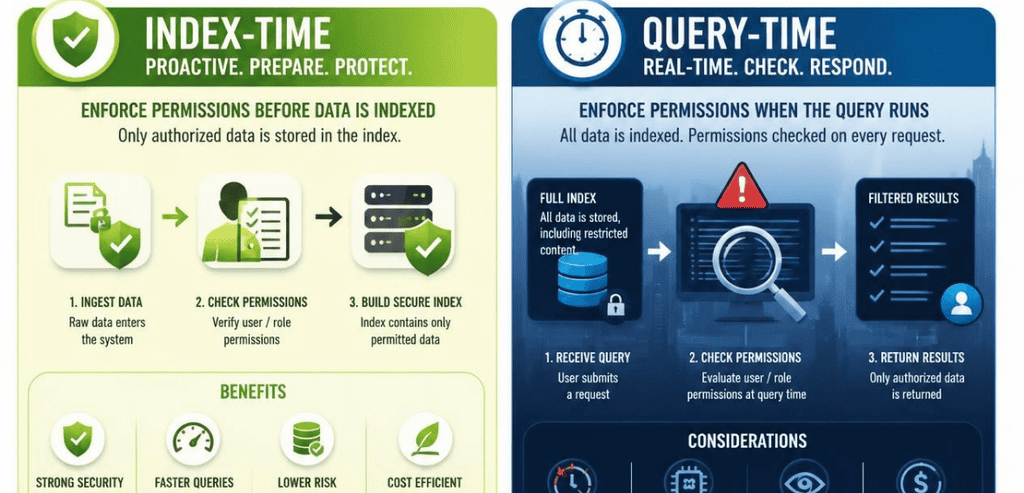
Here is the single most important technical idea in this whole topic. When does the system actually check permissions?
Index-Time Enforcement
Index-time enforcement examines access during the initial indexing of content. This system retains the visibility permissions for each content item and constructs the search index based on that retained information.
The primary concern is staleness. Permission information can become obsolete within a few hours of indexing. In circumstances where access permissions change after indexing, there is a risk of accessing content that should be restricted. This results in a risk of exposure. For sensitive information, indexing enforcement at access checks should not be the only control mechanism.
Query-Time Enforcement
Query-time enforcement rechecks permissions every time someone searches. It validates the user’s current, effective access before returning any result. If access was revoked five minutes ago, the content is already gone from their results.
The most effective systems do both. They index data along with access control metadata and validate access control at the time of data retrieval. This approach minimizes the gap of what was the case at the time of indexing and what is the case now. This is also a primary recommendation of the OWASP RAG Security Cheat Sheet. Access control metadata should be retained with each vector chunk, and access control should be enforced at the time of data retrieval and not at the time of data indexing.
How Permission Models Carry Through Different Systems
Not every system uses the same access model. A strong permission-aware search platform has to normalize them all into one consistent view.
RBAC (Role-Based Access Control) grants or denies access to information based on a user’s job role. Employees in a finance role would only be able to view documents and information pertaining to the finance department. This method of access control is an efficient and effective way to integrate access control with the way an organization is structured. ABAC (Attribute-Based Access Control) goes further than RBAC to grant or deny access based on parameters such as an employee’s department or job location. ReBAC (Relationship-Based Access Control) controls access based on the relationship between users and resources. Google’s Zanzibar is a great example.
The most difficult aspect of access control is scaling the system. Imagine thousands of employees accessing Google Search at the same time. Access control must evaluate and determine the visibility of every single user in real time and record every access decision to maintain a system of checks and balances. Many AI-based tools lack this capability due to the complexities of the engineering required to build a system at this scale.
Identity mapping is also critical, as a single user can have multiple accounts in different systems such as SharePoint and Slack. The search layer must identify and associate these accounts as belonging to the same user. Strong data pipelines facilitate this process by normalizing the user’s accounts to a single directory ID.
How Leading Platforms Handle Permission-Aware Search
Vendors take different paths to the same goal. Here is how a few notable platforms approach access control in enterprise AI search. When you evaluate any tool, ask one blunt question. Does it inherit source-system permissions, and does it recheck them at query time?
Microsoft 365 Copilot
Microsoft 365 Copilot works on the user level. It operates by calling the Microsoft Graph for the user and respects all the access controls the Graph puts in place. Simply put, Copilot does not circumvent your security. It works in accordance with it.
When it comes to security, this is a double-edged sword. Copilot reveals whatever a user is permitted to view, including information that is dangerously exposed due to broken inheritance and/or excessively large groups. Microsoft’s security guidance is very clear on this. The security issue lies in the permission gaps, not with the AI. To address this, Microsoft provides functionality such as SharePoint Advanced Management and Restricted Content Discovery to identify and address oversharing prior to using the assistant.
Glean
Glean is a cross-system enterprise search platform. It connects to a hundred or more tools and builds a single knowledge graph across all of them. Its enterprise graph understands both content relationships and permissions.
Glean’s model is built with system inheritance in mind. Any document open in Confluence will also be open in Glean. Any record restricted in Salesforce will be restricted in Glean. There is no permission model to design and no migration to handle. Workers will see what they are already permitted to see across different systems.
Notion
Notion applies permission-aware indexing across both its native content and connected tools. The aim is that users never see data they are not authorized to access, even through a search preview or an AI summary.
Notion’s guidance stresses a subtle but critical point. Inheritance logic has to be exactly right. Even a small inheritance bug can expose an entire department’s confidential data. The platform preserves source-system permissions rather than overriding them.
Best Practices for Permission-Aware Enterprise Search
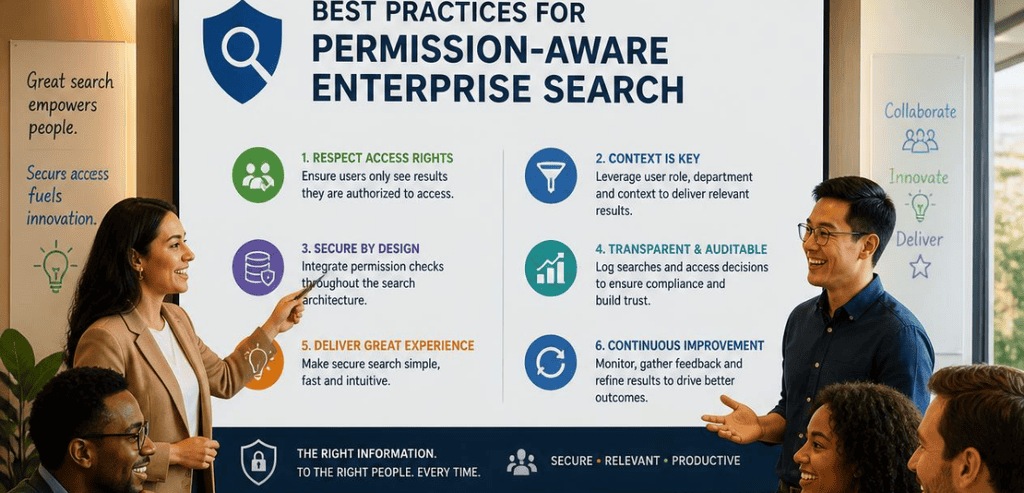
Begin auditing critical systems’ permissions and look for permissions that have been shared. Fix stale permissions for all critical systems and fix any broken permission inheritance.
A vendor must restrict permissions during query time. A vendor must restrict permissions during indexing time and must restrict permissions during query time. If permissions are removed, they must stop displaying the information associated with the search results.
Only information that is authorized may be used by AI. Determine if a user has permission to view the information prior to it being used by AI. Always review the information that is being displayed in the context window to verify that the AI model is being used within the defined permissions. The permissions will be applied within the retrieval, construction, and generation of the output of the AI model.
Lastly, AI-generated answers must be generated by a source that is permitted to answer the question, and the permissions must be logged. This will ensure that the requirements established in the SOC 2 and HIPAA standards are met. The concerns that are most related to security are addressed first. The Microsoft documentation related to Azure AI Search provides other examples regarding the enforcement of a document-level search.
Conclusion
Enterprise AI search is one of the most powerful productivity tools your company will adopt. It turns scattered institutional knowledge into instant answers. But that power cuts both ways. The same speed that helps a sales rep find a pricing doc can also expose a confidential file to the wrong person.
Permission-aware enterprise search is the safeguard that keeps this power in check. It makes sure access carries through every layer, from the source system to the final AI answer. When done well, it is nearly invisible. People simply find what they need, and never see what they should not.
The path forward is practical. Clean up your permissions, enforce access at query time, and choose a platform that inherits and rechecks source-system controls. Do that, and you get the best of both worlds. Fast, useful answers, without the leaks.
Frequently Asked Questions
What is permission-aware enterprise search in simple terms?
It is search that respects your existing access rules. If you cannot open a file in the original app, you will not see it in search results or AI-generated answers. The search tool inherits permissions from your source systems and enforces them for every user and every query.
Does AI search create new security risks?
Not exactly. AI search mostly exposes risks that were already present. Most organizations have years of permission sprawl and accidental oversharing. AI makes that content easy to find with a single prompt. The safest approach is to clean up source-system permissions first, then deploy permission-aware search on top.
Why is query-time permission checking so important?
Because permissions change all the time. People change roles, projects end, and access gets revoked. Index-time checks capture a snapshot that can go stale within hours. Query-time enforcement rechecks a user’s current access on every search, so revoked content disappears from results right away.
How do I evaluate an enterprise AI search vendor for security?
Ask direct questions. Does the tool inherit permissions from each connected system, or try to recreate them? Are permissions checked at indexing, at query time, or both? How fast does a permission change take effect? Can it produce audit logs and cite sources? Strong vendors can explain both the architecture and the day-to-day safeguards clearly.